
Copilot features now in Outlook for Windows
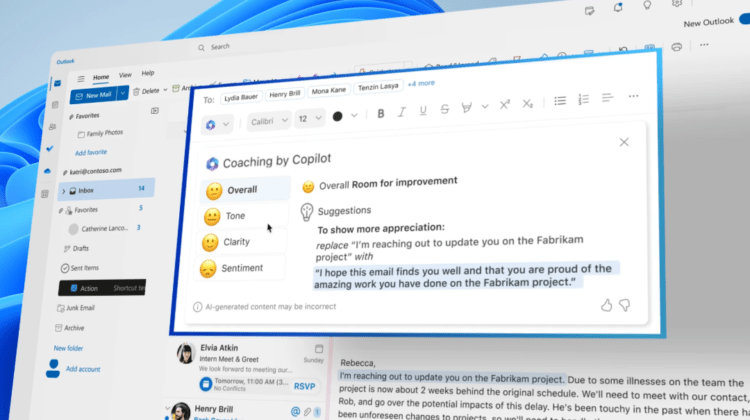
It has been a busy month for Microsoft – the tech giant has already announced new capabilities for Copilot integrated with the Microsoft 365 apps. Now, in response to the number of users who continue to rely on classic Outlook for their email, Microsoft has revealed that the features currently available in new Outlook for Windows and web will be rolled out to users of classic Outlook as well.
Starting from June 2024, the Copilot AI assistant will be accessible directly from the left bar in classic Outlook, where it will be pinned by default once available.
What are the new capabilities in classic Outlook?
Summarise
Allows users to quickly summarise email threads, extracting key points to manage lengthy conversations efficiently – accessed via the “Summarise” button in the reading pane.
Draft
Draft new emails and replies using natural language commands, with options to adjust the length and tone of emails – accessed through the Copilot icon in the ribbon after selecting “New Email” or replying to a message.
Coaching
Analyse email drafts, providing suggestions for improving tone, clarity, and reader sentiment – accessed via the Copilot icon in the ribbon under “Coaching by Copilot” once you’ve drafted a message.
Microsoft intends these capabilities to enhance user productivity through simplifying email management. It plans to continue adding new features to the new Outlook for Windows and web, with users of classic Outlook for Windows provided access within 3 to 12 months of initial release.
Copilot is available to all Microsoft 365 Business customers with the addition of a Copilot for Microsoft 365 licence. You can read more about Copilot’s capabilities and licences here.